Cloud services that gives free trial
Free Cloud Credits & Trials for Students (and Everyone) 💸☁️
Whether you’re building a portfolio, hosting a class project, or deploying an app while studying, cloud free tiers can save you a lot of money. This post compiles the most useful “start free” offers from major cloud providers, with links to the official pages and the most important limits to watch.
Why this fits SophiaPromo.codes: If you’re using Sophia Learning (or any online learning path), these cloud offers help you build real projects for your resume without paying upfront. You can also use them to host a simple website, API, database, or demo app.
⚠️ Important: Terms change often. Always confirm limits on the official pages before you sign up. Most offers require identity verification and can bill you if you exceed the free limits.
1) AWS (Amazon Web Services) – Free Tier + Credits
AWS offers a Free Tier experience that can include free usage of select services and (for many new accounts) credits you can apply toward eligible services. AWS also has “always free” service allowances (for example, AWS Lambda includes free requests each month).

What you get
- Free Tier structure: AWS has a Free Tier with different eligibility windows depending on the service, and newer account options may include credits and a limited-time “free plan” experience.
- Common Free Tier example: EC2 Free Tier often references 750 hours/month of select instance usage during the eligible period (region/service rules apply).
- Always-free example: AWS Lambda includes 1,000,000 free requests per month (plus a compute allowance) under its Free Tier.
Official links
- AWS Free Tier (official)
- Amazon EC2 Free Tier details (official)
- AWS Lambda Free Tier details (official)
Watch-outs
- Set billing alerts immediately after creating the account.
- Stop/terminate resources you’re not using (compute + storage + IPs can generate surprise costs).
2) Microsoft Azure – $200 Credit + 12 Months Free Services
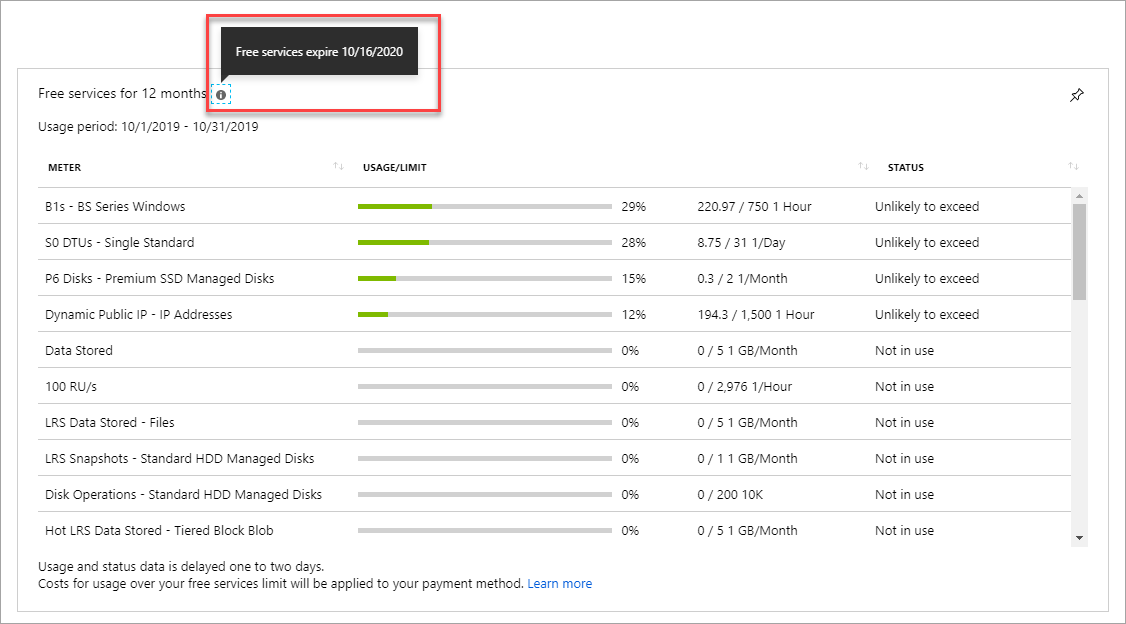
Azure’s free account includes a $200 credit to use within 30 days and access to a set of services that are free for 12 months, plus additional always-free services (within monthly limits).
What you get
- $200 credit: to spend across Azure services within the first 30 days.
- 12 months free: select popular services have monthly free amounts for a year (new customers).
- Always-free services: some services remain free within limits even after the first year.
Official links
Watch-outs
- Your subscription can be disabled when the credit ends (unless you upgrade to pay-as-you-go).
- Free monthly amounts do not roll over month-to-month.
3) Google Cloud – $300 Free Trial Credit
Google Cloud provides a Free Trial with $300 in credits for new customers and a set of “Free Tier” products with monthly free usage limits.
What you get
- $300 credit: designed for proof-of-concept builds and testing (valid for a limited time window described on Google’s official docs/pages).
- Free Tier products: some services remain free within monthly limits after the trial (eligibility rules apply).
Official links
Watch-outs
- Trial ends when credit is used up or the trial window expires (per official terms).
- Some services may require enabling billing settings carefully to avoid accidental charges.
4) Oracle Cloud – Always Free + $300 Trial Credit
Oracle Cloud Free Tier includes Always Free resources (no time limit, within capacity/limits) plus a $300 trial credit for a limited period (commonly listed as 30 days on Oracle’s official page).

What you get
- $300 cloud credit: typically available for a limited trial period (see official page for availability by country).
- Always Free services: selected compute, storage, and database services can remain free within limits.
Official links
Watch-outs
- Country availability and capacity limits can affect what you can actually provision.
- Identity verification is required, and multiple free accounts per person are not allowed.
5) DigitalOcean – $200 Credit for 60 Days (New Accounts)
DigitalOcean promotions commonly include $200 in credit for your first 60 days for new accounts. DigitalOcean also references this offer across its community/support ecosystem.
What you get
- $200 credit / 60 days: useful for testing Droplets (VMs), managed databases, app hosting, and more.
- Simple developer experience: easy deployments for small apps and portfolio projects.
Official links
- DigitalOcean homepage (official)
- DigitalOcean community post referencing the $200/60-day offer (official community)
Watch-outs
- Credit applies to new accounts only, and usage beyond the credit is billed.
- Don’t leave paid resources running after your test.
How to Use These Offers Safely ✅
- Create billing alerts (or budget limits) on day one.
- Use a checklist before you stop testing: delete VMs, snapshots, load balancers, and databases.
- Prefer “serverless” where possible (often easier to stay within free limits).
- Document your build: treat it like a portfolio project (GitHub repo + screenshots + short writeup).
Related (Sophia Learning + Projects)
If you’re learning with Sophia and want to turn coursework into real-world projects, these cloud credits are perfect for:
- Hosting a personal website or portfolio
- Deploying a small API (Flask/Node)
- Testing databases (PostgreSQL/MySQL)
- Building a demo app you can show employers
Need a Sophia discount? Start here: Sophia referral codes & discounts.
FAQ
Do I need a student email for these cloud offers?
No. The cloud offers in this post are generally available to new customers (not only students). Some providers also have separate student programs, but the core free tiers listed here don’t require a .edu email.
Will I get charged?
You can get charged if you exceed free limits, keep resources running, or upgrade to paid billing. Always set budgets/alerts and delete resources when you’re done.